

We are here to support you
Fast response. Clear SLAs. Secure by design. Our team keeps your systems running so your business can move forward.
At a glance
Key support highlights
- Priority based response and resolution times
- Escalation matrix up to executive team
- Data privacy with encryption and access control
- Ticket lifecycle transparency with feedback loop
Uptime
Commitment
Hour Response for
Urgent Priorities
Post Launch
Support
Emergency
Support
Ticket priorities and SLAs
Hover a card to preview its SLA band.
Cosmetic issues, questions or feature suggestions
Response: 12 Hour
Resolution: 2 Business Days
Non‑critical function affected or subset of users
Response: 8 Hour
Resolution: 12 Hours
Major disruption or severe performance degradation
Response: 4 Hour
Resolution: 8 Hours
Complete halt to operations without workaround
Response: 1 Hour
Resolution: 4 Hours
Escalation matrix
Details of Escalation Matrix at different Levels

Support Agent
First response & triage

Executive Team
Critical decision & vendor escalation

Senior Management
Cross‑team unblock & comms

Department Manager
Prioritization & resource assignment
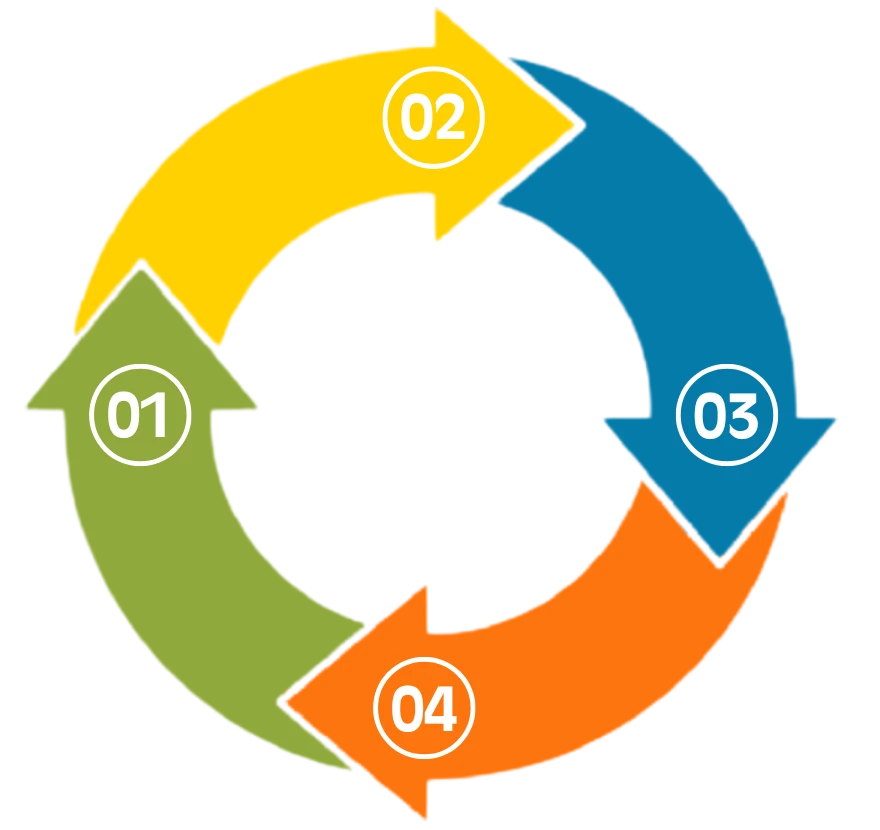
Ticket Lifecycle Process
Tickets can be submitted via email, website, or the portal.
You will receive an automated acknowledgment email with your ticket ID.
Once the ticket is resolved, you will be notified via email.
Upon resolution, you will automatically receive a feedback form to rate your experience.
If the issue persists, you can reopen the ticket by replying to the resolution email within 24 hours. Tickets not reopened within 24 hours will be marked as closed.
Data Protection and Confidentiality
We protect your information and meet global privacy expectations.Every request becomes a tracked ticket.
01
Encrypted
Data encrypted in transit and at rest.
02
Access control
Support data limited to authorized staff.
03
Retention
Support data kept for one year unless you request otherwise.
01
Encrypted
Data encrypted in transit and at rest.
02
Access control
Support data limited to authorized staff.
How to reach us
Every request becomes a tracked ticket.
TOP FAQ'S
Quick answers to reduce time-to-resolution.
How do I submit a new support ticket?
Via Email: Send an email to support@compusoftme.com.
A ticket will be automatically created and tracked.
Website: Visit www.compusoftme.com, Use the “Open a ticket” option on the Technical Support page.
Ticket Portal: Access support.compusoftme.com to submit a ticket and manage.
How do we classify priority?
Priority levels are assigned based on the severity and impact of the issue. The final classification for your ticket will be set by the support team.
What defines an "Urgent" vs. a "High" priority ticket?
Urgent (P1): Defined as critical issues that cause a complete halt to business operations with no viable workaround.
High (P2): Defined as major issues that significantly disrupt operations but do not entirely stop business processes.
Can I attach logs/screenshots?
Yes. Use the form pop‑in to upload files for faster triage.
How fast is the first response?
What are your response time Service Level Agreements (SLAs)?
Our comprehensive Response Time and Resolution Time SLAs are structured by ticket priority.
Urgent: 1 Hour Response
High: 4 Hour Response
Medium: 8 Hour Response
Low: 12 Hour Response
What is the process for escalating a support ticket?
If SLA targets for response or resolution are not met, the following steps are taken
First Response Delays: The ticket is escalated immediately to the Department Manager.
Resolution Delays:
Level 1: Assigned to the department supervisor.
Level 2: Escalated to senior management after one business day.
Final Escalation:
Critical unresolved cases are escalated to the executive leadership team.
How can I reopen a ticket if the issue is not fully resolved?
If the issue persists after resolution, you can reopen the ticket by replying to the resolution email. The ticket must be reopened within 24 hours of receiving the resolution email. Tickets not reopened within 24 hours will be marked as closed
How is my data and confidentiality protected during the support process?
Data Usage: We collect, process, and store customer data solely for the purpose of providing technical support.
Data Security: All customer data is encrypted during storage and transmission, and access to data is strictly limited to authorized personnel.
Confidentiality: Customer information will not be shared with third parties without explicit consent, except where required by law. All support interactions are logged and monitored for quality assurance while adhering to data privacy laws.
Compliance: CompuSOFT complies with global data protection regulations.



Need help now?
Open a ticket and our team will respond within the SLA for your priority.